Keep the Apple Account that already holds iCloud, and open a second account for the United States store unless that first account has no balance, no blocking subscription, and no Family Sharing.
Which path to use
Read this table before you open Country or Region.
| Your situation | What to do |
|---|---|
| The daily account has iCloud+, Apple Music, or Family Sharing | Leave its country alone and create a second Apple Account for the US store. |
| That account has no balance, no blocking subscription, and no pending order | Change it to the United States only after the checklist on Apple's change-country page. |
| You are physically in the United States and do not want to enter a payment method | Apple's page says to create a new Apple Account while you are there. |
Create the account
Create it on the Apple Account website, then follow Apple's create-account page and turn on two-factor authentication before the first purchase.
Step 1
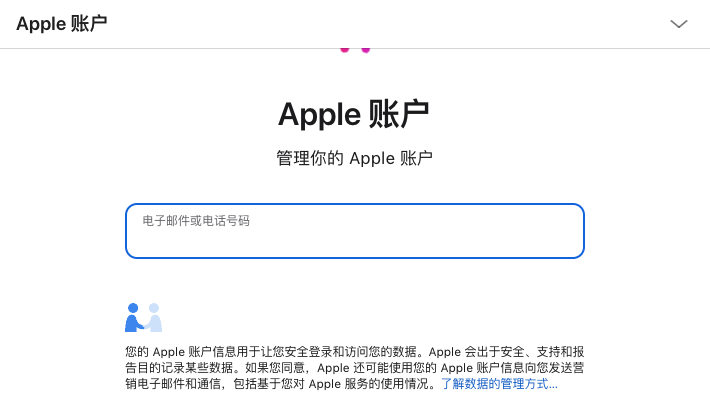
Open the Apple Account website, where the live page first asks for an email or phone number, and Apple's create-account page still names the entry Create Your Apple Account.
Step 2
Enter an email you can read, a strong password, and United States as the region.
Step 3
Enter your birthday and a phone number you can always reach.
Step 4
Verify the email and the phone number.
Step 5
Turn on two-factor authentication, because an account created with it cannot turn that protection off.
Step 6
If checkout asks for a payment method, use one the United States store accepts, and enter the billing address that belongs to that method.
Before you change country
A country change fails for the reasons on Apple's change-country page, which Apple published on 2026-10-30.
| Gate | What Apple requires |
|---|---|
| Remaining balance | Spend it first, and contact Apple Support if it is below the price of one item. |
| A subscription that blocks the change | Cancel it, then wait until the paid period ends. |
| Membership, pre-order, rental, Season Pass, or pending refund | Wait until it finishes, or cancel the pre-order. |
| Family Sharing | The change can stay blocked until you leave the group. |
| A payment method for the new country | The change can ask for one, so create a new account if you do not want to enter one. |
| Apple One or iCloud+ canceled | iCloud storage falls back to the free 5 GB. |
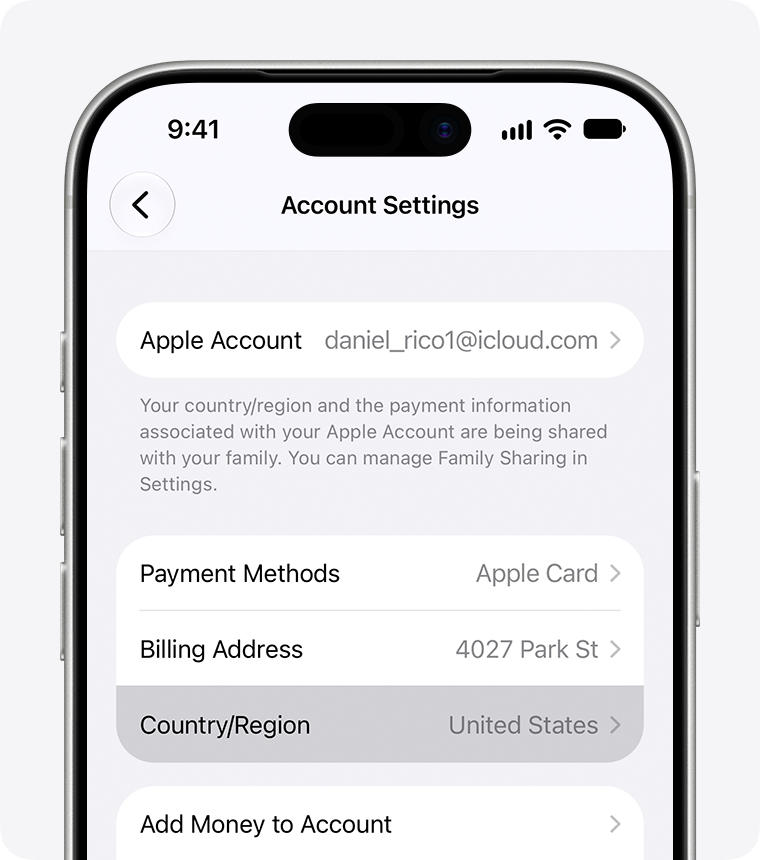
On iPhone the steps are below, while Mac uses Apple Music or Apple TV then Account Settings, Windows uses View My Account, and the web uses Personal Information.
Step 1
In Settings, tap your name.
Step 2
Tap Media and Purchases, and sign in if asked.
Step 3
Tap Country or Region.
Step 4
Select United States.
Step 5
Read the terms and agree.
Step 6
Select a payment method and enter the billing address that belongs to it.
Payment methods
The United States and mainland China do not share one list, and this table follows Apple's payment-method page published on 2026-11-20.
| Kind | United States | China mainland |
|---|---|---|
| Balance | Apple Gift Card, or Add Money. | An App Store top-up card, or Add Money. |
| Cards | Most credit and debit cards, plus Apple Card. | Most credit and debit cards, and the page footnote says they cannot add funds. |
| Other | Apple Cash, Apple Pay with two-factor authentication, and PayPal, which may ask the provider to verify you. | Alipay, WeChat Pay, and Douyin Pay. |
Step 1
In Settings, tap your name.
Step 2
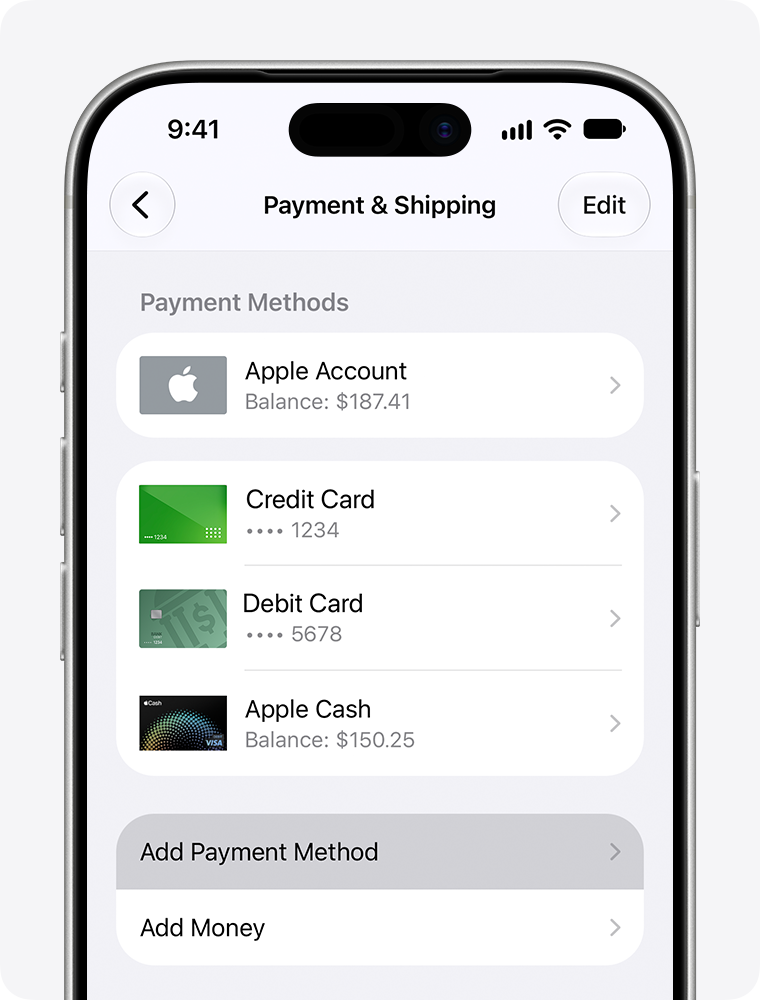
Tap Payment and Shipping, and sign in if asked.
Step 3
Tap Add Payment Method.
Step 4
Enter the payment details, and check that the name and billing address match the financial institution.
Step 5
Tap Done.
Add money or redeem a code
The two official paths are Add Money, published on 2026-11-11, and redeeming a code, published on 2026-09-21.
| Kind | What to do |
|---|---|
| Add Money | The account must already have a payment method the US store accepts. |
| Redeem a code | Use the code that begins with X, not the serial number on the same card. |
Step 1
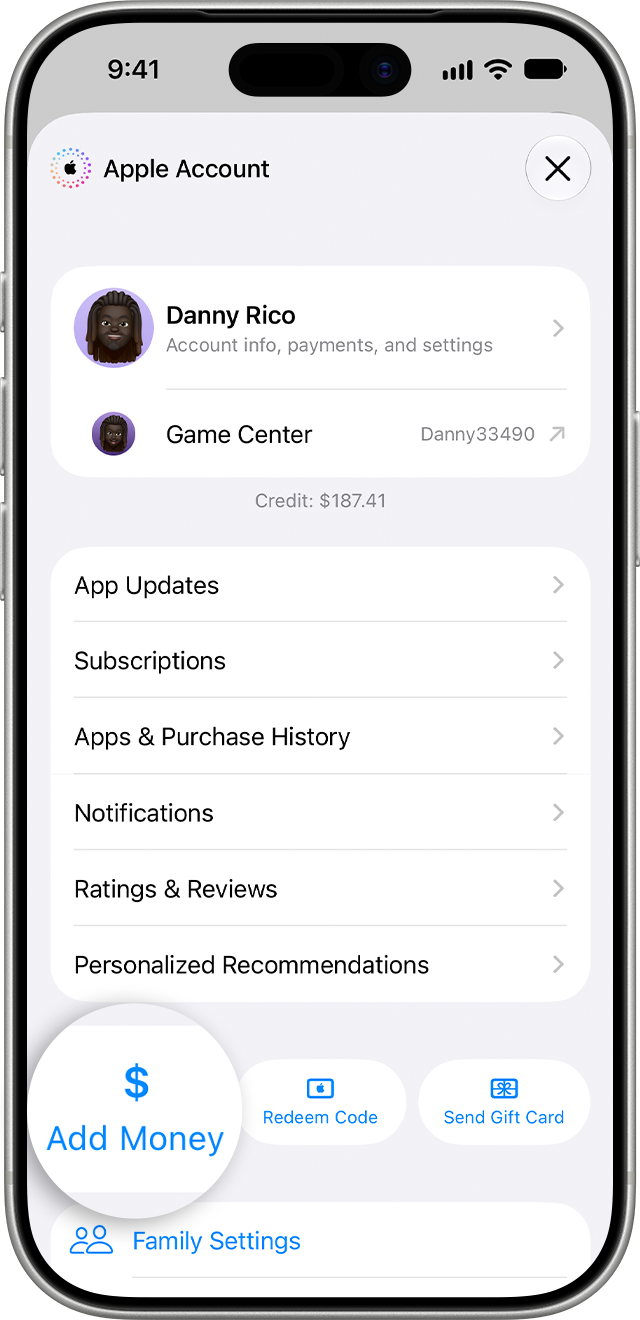
In the App Store, tap your photo or My Account, then tap Add Money.
Step 2
Tap the amount you want, or tap Set Up Auto Reload where that option exists.
Step 3
Follow the onscreen instructions, because some payment methods ask you to verify by text or another method.
Step 4
Wallet can also add money after the Apple Account card is in Wallet, and Apple Pay there needs iOS 18.1 or later.
Step 1
Find the 16-digit code on the back of the card, and peel or scratch the label if the code is hidden.
Step 2
In the App Store, tap your photo, your initials, or My Account, and sign in if asked.
Step 3
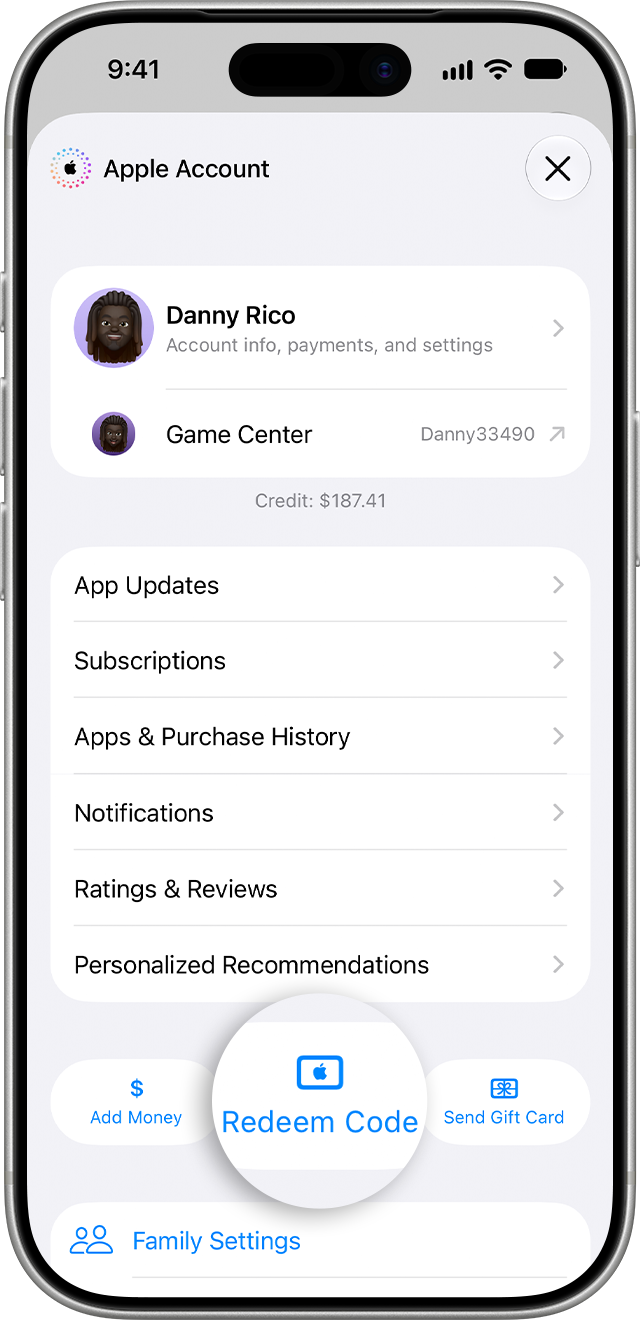
To redeem, tap your photo, tap Redeem Code, then use the camera or type the code.
Step 4
Do not type the serial number, which can begin with GCA, PBH, or EPY.
Step 5
Tap Redeem.
A gray, white, silver, or gold Apple Store Gift Card cannot be redeemed in the App Store, which Apple's redeem-error page states directly.
A card bought in another country must be redeemed there, and a card already redeemed or not yet activated will not add a balance.
Download from the US App Store
The storefront follows the account signed in under Media and Purchases, not the iCloud account.
Step 1
Sign Media and Purchases into the US account, and leave iCloud on the original account.
Step 2
Open the App Store and confirm the account photo is the US account.
Step 3
If a free app will not download or update, update the payment method first, which is what Apple's payment page says to do.
Step 4
An app bought on another storefront updates from the account that bought it.
Keep the account
A US Apple Account is the store identity, not a membership in the Apple Developer Program.
Step 1
In Sign-In and Security, keep two-factor authentication on and keep one trusted phone number you can reach if this phone is lost.
Step 2
Do not send the password or the six-digit code to anyone offering to add funds.
Step 3
Subscriptions are under Settings, your name, then Subscriptions, and Apple's balance page says Family Sharing members cannot spend your balance.
Step 4
App Store submission still needs a separate Apple Developer Program enrollment.
Questions
Is a US Apple ID a different login from an Apple Account?
No, Apple renamed Apple ID to Apple Account and you still sign in with the same email or phone number.
Can a mainland China top-up card fund a US account?
No, gift cards and codes redeem only on the storefront of the country where they were sold.
What should I check when a country change fails?
Check the balance, whether a blocking subscription has actually ended, pre-orders and refunds, and Family Sharing.
Can one device use two Apple Accounts?
Yes, iCloud can use one account while Media and Purchases uses another, and you should not change the iCloud account's country just to switch the store.
What to do
Keep the daily account for iCloud, use a new account for the US store, and change country only after the balance, subscriptions, and Family Sharing are clear.
Signing and submission steps are in App Store engineering workflow, and building without a local Mac is in Windows iOS guide.
